Optional Mods: Difference between revisions
| (16 intermediate revisions by 5 users not shown) | |||
| Line 3: | Line 3: | ||
There are several optional mods that can be downloaded and used for your personal experience. The mods you choose to install do not affect other players, as they can only be seen by you. Use them at your own risk, as they may impact performance. Not all available mods will be compatible with each other, and some may depend on others. All available mods are listed below. | There are several optional mods that can be downloaded and used for your personal experience. The mods you choose to install do not affect other players, as they can only be seen by you. Use them at your own risk, as they may impact performance. Not all available mods will be compatible with each other, and some may depend on others. All available mods are listed below. | ||
===''' | ==='''[[Olympus Client Mod]]'''=== | ||
This | This optional mod will give you different cosmetic visuals for items already existing in the game. | ||
*Retextures of Vanilla Arma Models | |||
*Arma 3 Vanilla UI | |||
*Helmet Models | |||
*Retextures of Police Cosmetics | |||
Subscribe [https://steamcommunity.com/sharedfiles/filedetails/?id=3034823753 here]. | |||
<gallery mode=packed heights=400px> | <gallery mode=packed heights=400px> | ||
File: | File:ClientModOLY.jpg|<span style="color:#c1c1b8">Client Mod Trailer</span>|link=https://www.youtube.com/watch?v=Mt-pNmo4W2M | ||
File: | File:CopTaser2023.jpg|<span style="color:#c1c1b8">Cop PO7 remodeled.</span> | ||
File:OlympusClientMod2023.jpeg|<span style="color:#c1c1b8">[https://steamcommunity.com/sharedfiles/filedetails/?id=3034823753 Subscribe]</span> | |||
</gallery> | </gallery> | ||
===''' | ==='''Cinematic Lens Flare'''=== | ||
This | This is a small add-on that replaces the vanilla lens flare effect with the more cinematic texture from the alpha. | ||
Subscribe [https://steamcommunity.com/sharedfiles/filedetails/?id= | Subscribe [https://steamcommunity.com/sharedfiles/filedetails/?id=878502647&searchtext=lens here]. | ||
<gallery mode=packed heights=400px> | <gallery mode=packed heights=400px> | ||
File: | File:Cinematic.png|<span style="color:#c1c1b8">The Cinematic Lighting Replacement mod.</span> | ||
File: | File:VanillaCinematic.png|<span style="color:#c1c1b8">The vanilla Altis lighting.</span> | ||
</gallery> | </gallery> | ||
===''' | ==='''Enhanced GPS'''=== | ||
Makes the Arma 3 vanilla GPS readable and suitable for use. | |||
Adds a High contrast version for helicopters and planes, to see obstacles clearly and dodge them easily. | |||
On the High contrast version, power lines are marked in green. Terrain at your altitude level or above is marked in red areas. Compatible with Map Darkmode. | |||
Subscribe [https://steamcommunity.com/sharedfiles/filedetails/?id= | Subscribe [https://steamcommunity.com/sharedfiles/filedetails/?id=2480263219&searchtext=enhanced here]. | ||
<gallery mode=packed heights=400px> | <gallery mode=packed heights=400px> | ||
File: | File:EnhancedGPS.png|<span style="color:#c1c1b8">The Enhanced GPS mod.</span> | ||
</gallery> | </gallery> | ||
==='''Map | ==='''Enhanced Map'''=== | ||
Makes the Arma 3 map look like a real Topographic map. | |||
Other changes include better Satellite view, better colors and enhanced readability. Compatible with Map Darkmode. | |||
Subscribe [https://steamcommunity.com/sharedfiles/filedetails/?id= | Subscribe [https://steamcommunity.com/sharedfiles/filedetails/?id=2467589125&searchtext=enhanced here]. | ||
<gallery mode=packed heights=400px> | <gallery mode=packed heights=400px> | ||
File: | File:EnhancedMap.png|<span style="color:#c1c1b8">The enhanced map mod.</span> | ||
File: | File:VanillaMapMod.png|<span style="color:#c1c1b8">The vanilla Altis map.</span> | ||
</gallery> | </gallery> | ||
===''' | ==='''Livonia Lighting Replacement'''=== | ||
This is a relatively low performance-altering mod that replaces the altis lighting with the lighting from Livonia, giving the island a warmer atmosphere. It is not compatible with Splendid Lighting Modification. | |||
Subscribe [https://steamcommunity.com/sharedfiles/filedetails/?id= | Subscribe [https://steamcommunity.com/sharedfiles/filedetails/?id=1862157876 here]. | ||
<gallery mode=packed heights=400px> | <gallery mode=packed heights=400px> | ||
File: | File:LivoniaLighting.png|<span style="color:#c1c1b8">The Livonia Lighting Replacement mod.</span> | ||
File:VanillaLighting.png|<span style="color:#c1c1b8">The vanilla Altis lighting.</span> | |||
</gallery> | </gallery> | ||
==''' | ==='''Splendid Lighting Modification'''=== | ||
This modifies the lighting and shadows of terrain and objects to better fit in with the weather and time, making it seem more realistic. It is not compatible with Livonia Lighting Replacement. | |||
Subscribe [https://steamcommunity.com/sharedfiles/filedetails/?id=2070681304 here]. | |||
Subscribe [https://steamcommunity.com/sharedfiles/filedetails/?id= | |||
<gallery mode=packed heights=400px> | <gallery mode=packed heights=400px> | ||
File: | File:SpledidLighting.png|<span style="color:#c1c1b8">The Splendid Lighting Modification.</span> | ||
File: | File:VanillaLighting.png|<span style="color:#c1c1b8">The vanilla Altis lighting.</span> | ||
</gallery> | </gallery> | ||
===''' | ==='''Map Darkmode'''=== | ||
The dark map is an aesthetically pleasing mod that makes the map look much better. Compatible with Enhanced GPS and Enhanced Map | |||
Subscribe [https://steamcommunity.com/sharedfiles/filedetails/?id= | Subscribe [https://steamcommunity.com/sharedfiles/filedetails/?id=2479224750&searchtext=Map+Dark here]. | ||
<gallery mode=packed heights=400px> | <gallery mode=packed heights=400px> | ||
File: | File:DarkMap.jpg|<span style="color:#c1c1b8">The map with Darkmode.</span> | ||
File:VanillaMap.jpg|<span style="color:#c1c1b8">The vanilla map.</span> | |||
</gallery> | </gallery> | ||
Latest revision as of 01:04, 12 November 2025
Client-Side Mods
There are several optional mods that can be downloaded and used for your personal experience. The mods you choose to install do not affect other players, as they can only be seen by you. Use them at your own risk, as they may impact performance. Not all available mods will be compatible with each other, and some may depend on others. All available mods are listed below.
Olympus Client Mod
This optional mod will give you different cosmetic visuals for items already existing in the game.
- Retextures of Vanilla Arma Models
- Arma 3 Vanilla UI
- Helmet Models
- Retextures of Police Cosmetics
Subscribe here.
Client Mod Trailer
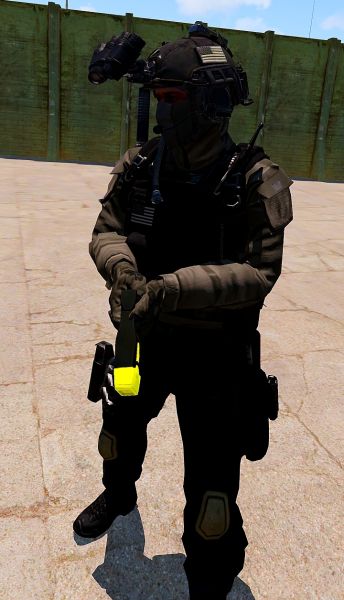
Cop PO7 remodeled.


Cinematic Lens Flare
This is a small add-on that replaces the vanilla lens flare effect with the more cinematic texture from the alpha.
Subscribe here.
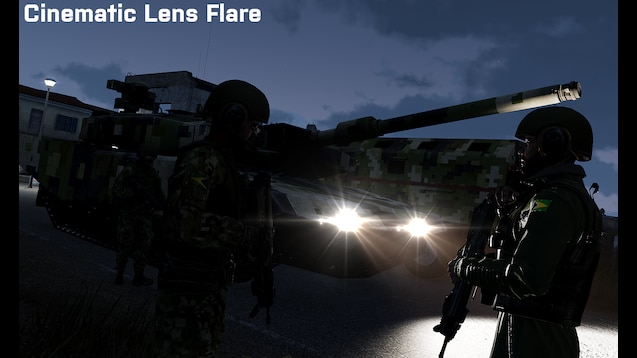
The Cinematic Lighting Replacement mod.
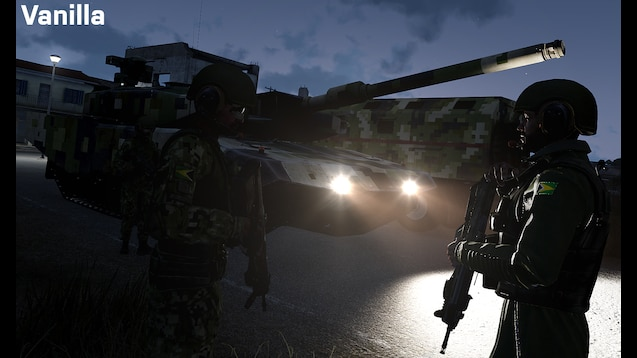
The vanilla Altis lighting.


Enhanced GPS
Makes the Arma 3 vanilla GPS readable and suitable for use. Adds a High contrast version for helicopters and planes, to see obstacles clearly and dodge them easily. On the High contrast version, power lines are marked in green. Terrain at your altitude level or above is marked in red areas. Compatible with Map Darkmode.
Subscribe here.
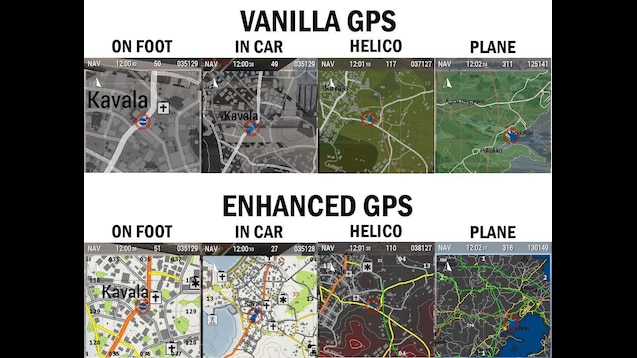
The Enhanced GPS mod.

Enhanced Map
Makes the Arma 3 map look like a real Topographic map. Other changes include better Satellite view, better colors and enhanced readability. Compatible with Map Darkmode.
Subscribe here.
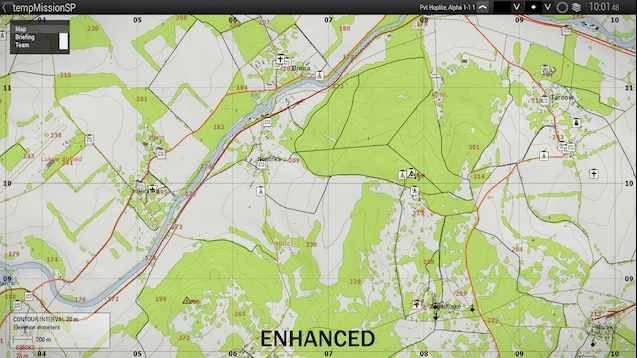
The enhanced map mod.
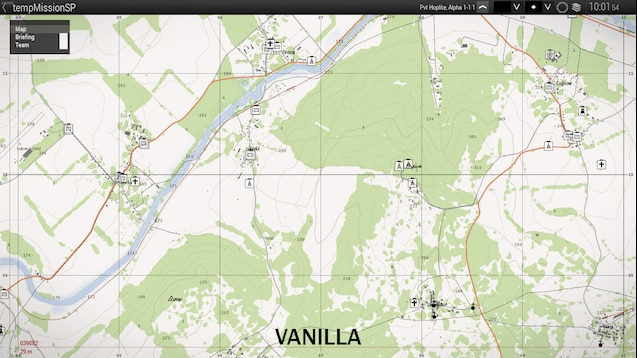
The vanilla Altis map.


Livonia Lighting Replacement
This is a relatively low performance-altering mod that replaces the altis lighting with the lighting from Livonia, giving the island a warmer atmosphere. It is not compatible with Splendid Lighting Modification.
Subscribe here.
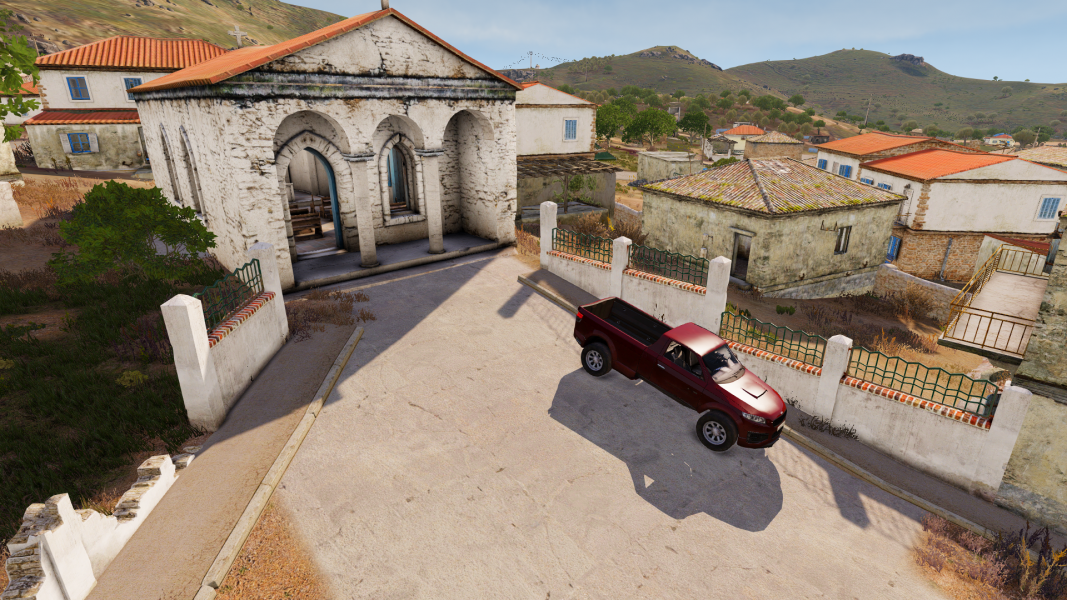
The Livonia Lighting Replacement mod.
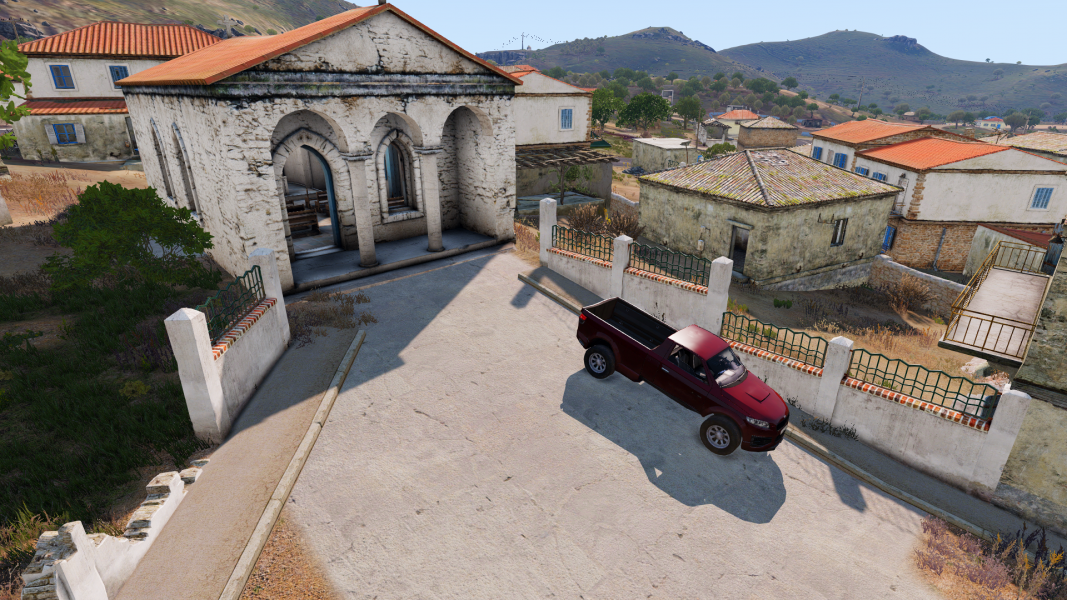
The vanilla Altis lighting.


Splendid Lighting Modification
This modifies the lighting and shadows of terrain and objects to better fit in with the weather and time, making it seem more realistic. It is not compatible with Livonia Lighting Replacement.
Subscribe here.
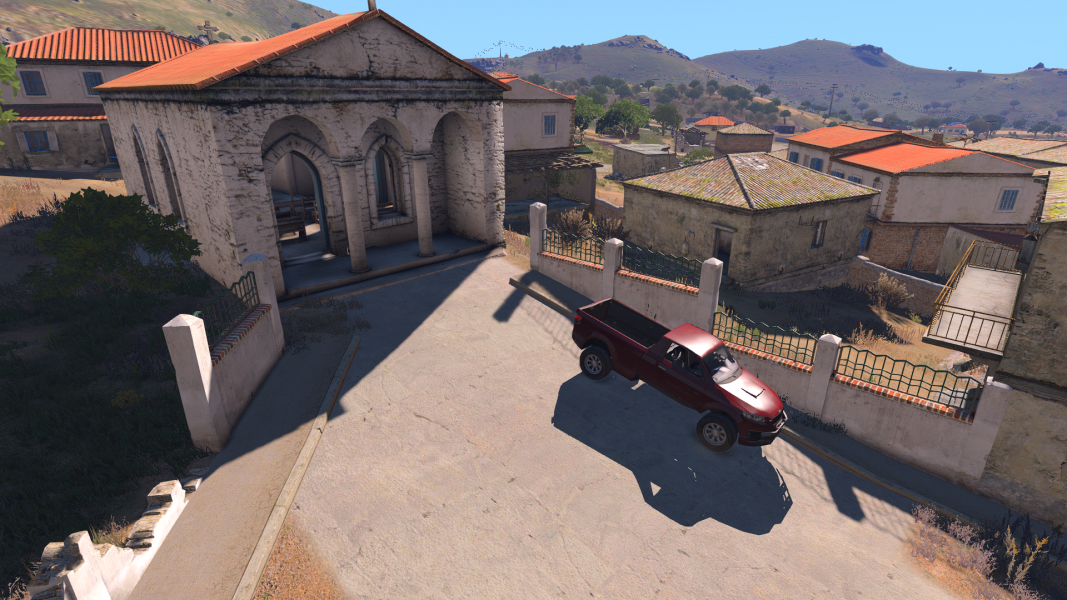
The Splendid Lighting Modification.
The vanilla Altis lighting.

Map Darkmode
The dark map is an aesthetically pleasing mod that makes the map look much better. Compatible with Enhanced GPS and Enhanced Map
Subscribe here.
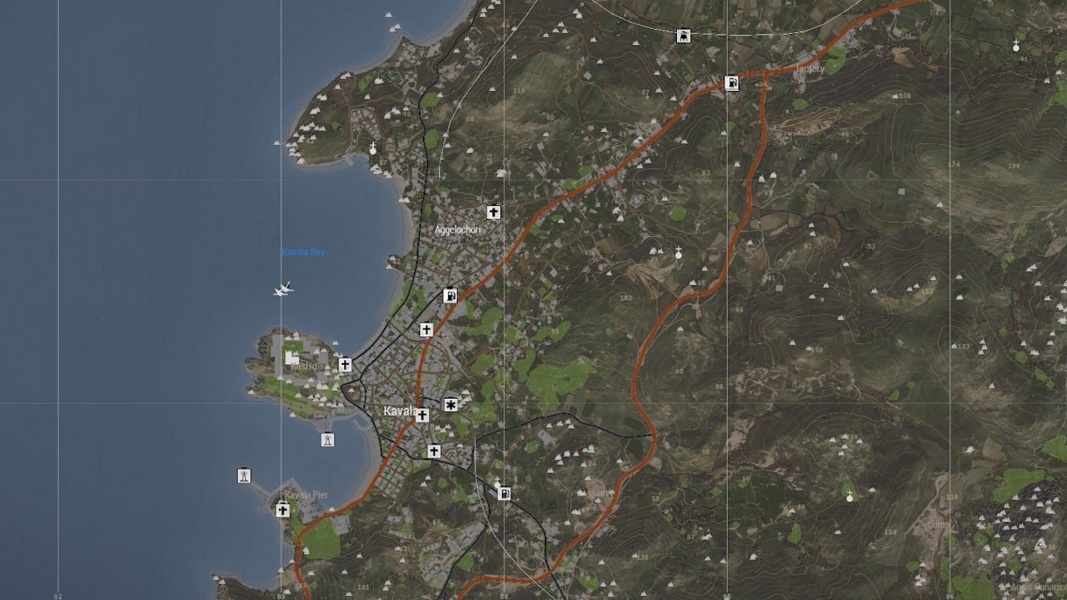
The map with Darkmode.
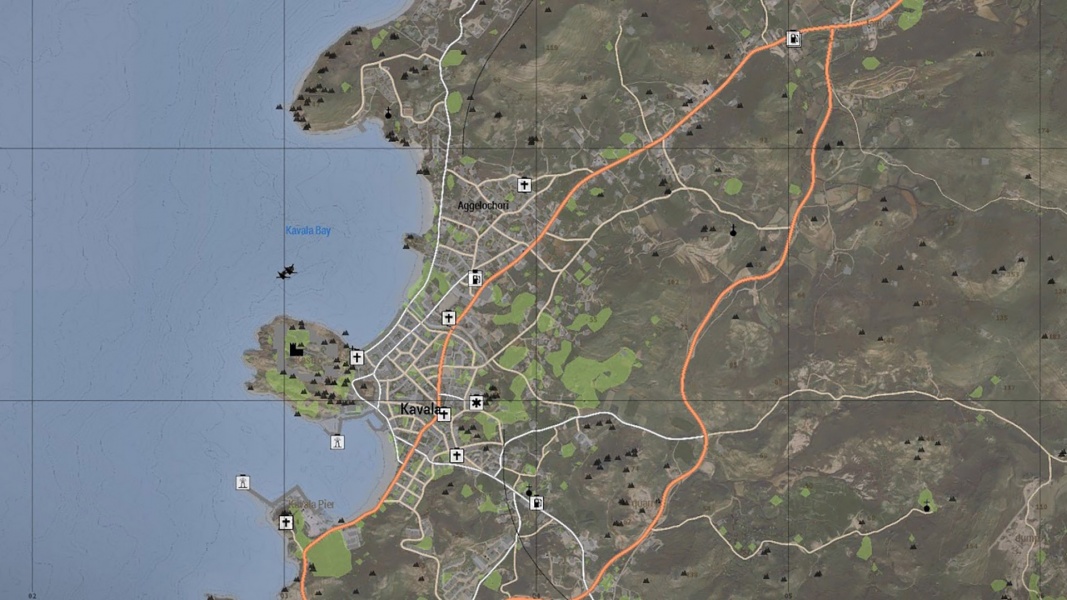
The vanilla map.

